

Where the reviews live
Open More in the project, then App Store. The section has two tabs: App Review for your submissions, and Ratings for what customers say.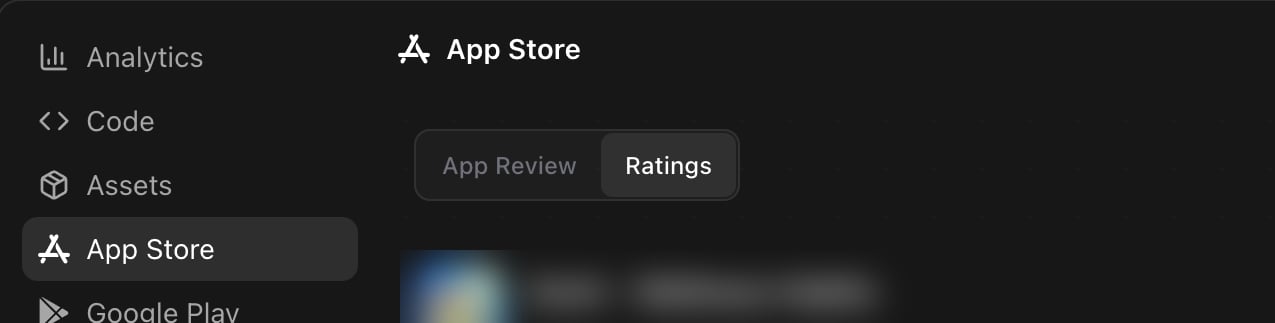
More, then App Store. The Ratings tab holds the customer reviews.
Read the numbers first
The top of the tab summarises the account: Average rating out of 5, the number of total ratings, and a Rating breakdown from 5 stars down to 1. View on App Store opens your public listing. Three counters follow, and the third one is the one to watch:
Written reviews, New this week, and Needs response, with the filters underneath.
Find the reviews that need an answer
Three filters sit above the list. Set the response state to Needs response and you see only the open ones.
Refresh reviews pulls the list again from App Store Connect. The list shows 25 reviews at a time, so use Previous and Next for older ones. When a filter matches nothing the panel says No matching reviews, and suggests changing a filter.
Each row carries the review title, the stars, the reviewer nickname, the date, and the country, then the text. After you answer, the row keeps a Your response block with your reply, its state, and the date it changed.
Get told when a review arrives
Rork checks App Store Connect for you and files a notification called App Store review when a new one lands. The notification quotes the review and names the reviewer and the country. A review of 1 or 2 stars is marked as a warning, so a bad rating does not sit unread for a week. Press View review on the notification. Rork opens the project on the Ratings tab and scrolls to that exact review.Reply with the agent
You write nothing by hand. Ask in the chat, and the agent handles the App Store side.1
Ask for the open reviews
2
Ask for drafts
3
Approve the exact text
A developer response is public, so nothing is posted until you say yes. Change the wording in the chat until it reads the way you want.
4
Let the agent post it
Ask for drafts only, and the agent stops after showing them. That is the safe way to see what it would say before you trust it with the store.
Answer many reviews at once
Several reviews often say the same thing, for example that a paywall arrives too early. One reply text can cover all of them.What makes a good response
The agent follows the rules Apple reviewers and readers expect, and it helps to know them, because you approve the text:- Short, specific, and about the feedback in that review.
- No promotional copy, no discount codes, no internal links.
- No private customer data, and no blame.
- It never asks the person to change their rating.
- It promises a fix, a version, a refund, or a date only when that is true.
What this cannot do
- Ratings arrive only after the app is live on the App Store. TestFlight feedback is separate, see TestFlight: put your app on real phones.
- Apple allows one developer response per review. Rork treats a review that has one as handled, so say so plainly when you want an answer replaced.
- The reply is public. Anyone reading your listing sees it under the review.
- This tab covers the App Store. Google Play reviews stay in Play Console.
- A project with no App Store submission has no reviews to read, and the Ratings tab stays hidden.
FAQ
Why is the Ratings tab missing?
Why is the Ratings tab missing?
The app is not live on the App Store yet. Submit it and pass review first, see Publish Your App to the Apple App Store.
Can Rork post a reply without asking me?
Can Rork post a reply without asking me?
No. The agent shows the exact response text and the review it targets, then waits for your approval.
Do I need App Store Connect open in another tab?
Do I need App Store Connect open in another tab?
No. Rork uses the App Store Connect access from your submission, so reading reviews and posting replies both happen in the project.
How fast does a new review show up?
How fast does a new review show up?
Rork syncs from App Store Connect on a schedule and notifies you when a review lands. Press Refresh reviews when you want the list pulled again right now.
Can I answer reviews in a different language?
Can I answer reviews in a different language?
Yes. Ask for the reply in the language of the review. Say which language, and the agent drafts it there.
What about Google Play reviews?
What about Google Play reviews?
They are not in this tab. Answer those in Play Console. Rork does handle the Play release itself, see How to publish your Rork app to Google Play Store.
A review reports a real bug. What now?
A review reports a real bug. What now?
Paste it into the chat and ask for the fix. The agent reads your code, changes it, and you ship a new build, see Publish Your App to the Apple App Store. Mention the fix in the reply only after the build is out.
Next steps
Publish to the App Store
The submission flow that gives Rork its App Store access.
AI App Store Reviewer
Catch the rejection risks before Apple does.
TestFlight testers
Collect feedback before the public sees it.
Project analytics
Installs and revenue next to the reviews.