

Paid plans (Rork Pro and Rork Max) reset on the monthly anniversary of your first purchase. The Free plan resets at the start of each calendar month.
Design mode and Build mode
Rork splits the work into two modes, and this is the main difference between Free and the paid plans.- Design mode explores app designs. You describe your idea and Rork proposes the screens and the look. The Free plan runs in Design mode.
- Build mode turns those designs into a working app: real Swift, Kotlin, or React code that you can preview, test on a device, and publish. A paid plan unlocks Build mode.
What is a credit?
A credit is a unit of AI compute, roughly one request where Rork designs, builds, or edits your app. Every plan includes a set number of credits per month. When you run out, you can upgrade your plan or wait for your monthly reset.- Free plan: 5 design credits per day. The monthly allowance depends on your region: 35 credits/month in major markets (US, UK, Canada, the EU, Japan, Korea, Australia, and other major countries) and 5 credits/month elsewhere.
- Paid plans (Pro and Max): no daily cap, so you can spend your full monthly allowance whenever you want.
Plans at a glance
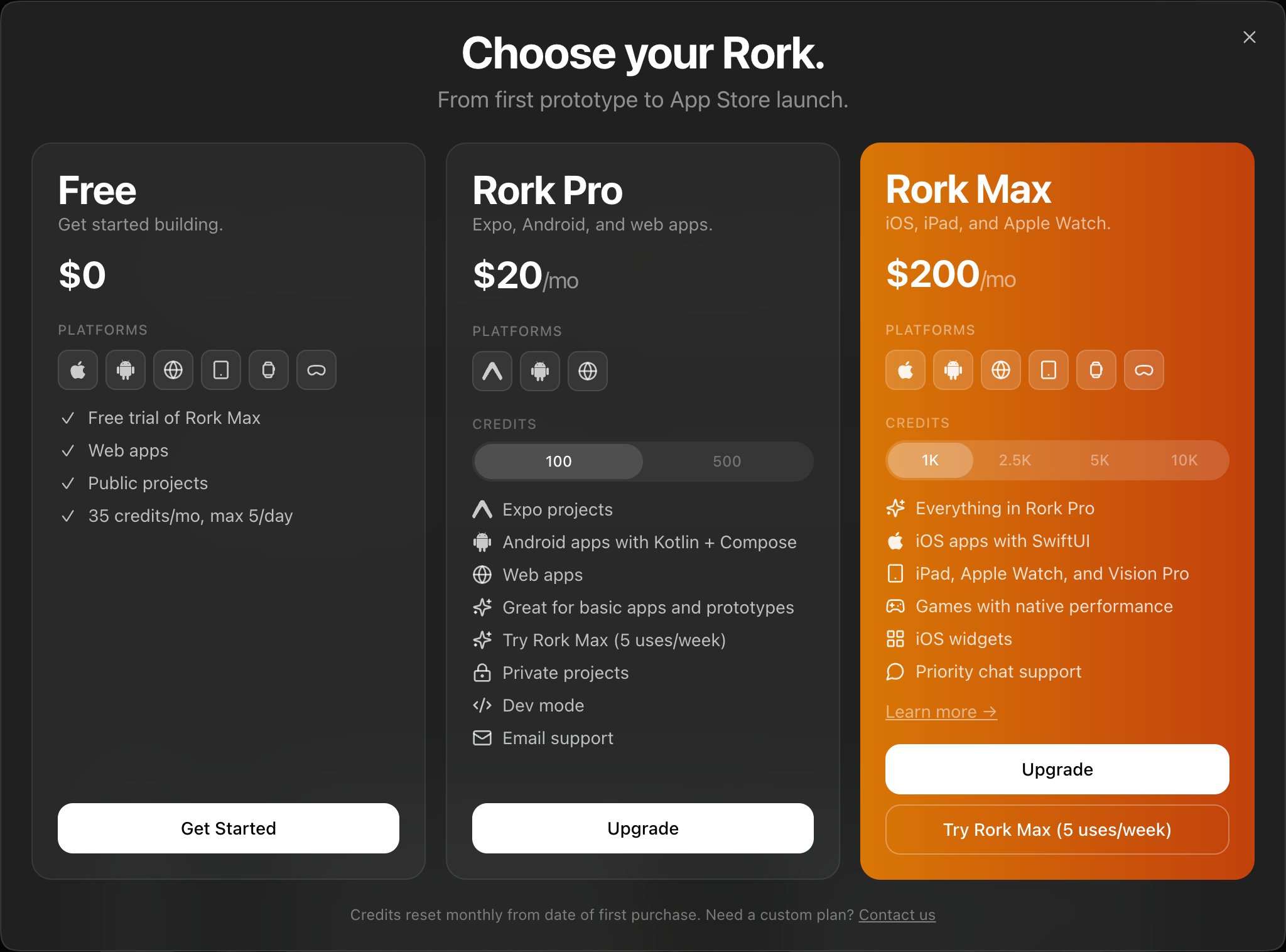
Native iPhone apps with SwiftUI are included in Rork Pro. You do not need Rork Max to build for iPhone. Rork Max adds the rest of the Apple devices (iPad, Apple Watch, Vision Pro), native games, iOS widgets, and priority chat support.
Models by plan
The available models update as Rork adds and changes models. The catalog below is refreshed daily from Rork’s public model catalog.Major countries are the US, UK, Canada, the EU, Japan, Korea, Australia, and other major markets. Models marked first message are available for a new project’s first prompt only.
Free ($0/mo)
Design your app for free, no card required.- Design mode: explore app designs for iPhone, Android, web, iPad, Apple Watch, and Vision Pro
- Private projects
- 5 design credits/day, with up to 35 credits/month in major markets (5 credits/month in other regions)
Rork Start (₹649/mo, India only)
An entry plan sold in India, in rupees. Platforms: iPhone (SwiftUI), Android (Kotlin + Compose), Web Included:- Build mode
- iPhone apps with SwiftUI
- Android apps with Kotlin + Compose
- Web apps
- Light models only, picked automatically
- Private projects
- Dev mode (edit the underlying code)
- 40 credits/month
Rork Pro ($20/mo)
Build native iPhone apps with SwiftUI, native Android apps with Kotlin + Compose, and web apps. A good fit for a first real product, and for prototypes. Platforms: iPhone (SwiftUI), Android (Kotlin + Compose), Web Included:- Build mode: turn designs into working apps
- iPhone apps with SwiftUI
- Android apps with Kotlin + Compose
- Web apps
- Private projects
- Dev mode (edit the underlying code)
- 100 credits/month
- Support: Email
Rork Max (from $200/mo)
For the full Apple device family and for power users. Everything in Rork Pro, plus the rest of Apple’s platforms. Platforms: iPhone (SwiftUI), Android, Web, iPad, Apple Watch, Vision Pro Included:- Everything in Rork Pro
- iPad, Apple Watch, and Vision Pro
- Games with native performance
- iOS widgets
- Priority chat support
What the icons mean
Each plan shows a Platforms strip (the devices you can build for) plus feature icons in the list below it.Platform icons
 Android (Kotlin + Compose): native Android apps
 iPhone (SwiftUI): native iOS apps
 Web: web apps
 iPad: iPad apps with adaptive layouts
 Apple Watch: Apple Watch apps
 Vision Pro: visionOS spatial experiences
Feature icons
 A capability included in the plan
 Private projects: your code stays private
 Dev mode: edit the underlying code
 Email support
 Chat / priority chat support
 Games: native performance
 iOS widgets
Custom & Scale plans
Need more than 10,000 credits/month, or enterprise terms? If you need a Custom Plan, please contact us.FAQ
What is a credit?
A credit is a unit of AI compute, roughly one request where Rork designs, builds, or edits your app. Each plan includes a set number of credits per month (see the reset schedule below).What’s the difference between Rork Pro and Rork Max?
Rork Pro builds native iPhone apps (SwiftUI), native Android apps (Kotlin + Compose), and web apps. Rork Max adds iPad, Apple Watch, and Vision Pro, plus native games, iOS widgets, and priority chat support. Pick Pro for iPhone, Android, and web. Pick Max when you need the wider Apple device family or the Max-only features.Do I need Rork Max to build an iPhone app?
No. Rork Pro builds native iPhone apps with SwiftUI. Rork Max is for the other Apple devices (iPad, Apple Watch, Vision Pro), native games, and iOS widgets.Are my projects public on the Free plan?
No. Every project is private, on every plan, including Free.When do my credits reset?
Paid plans (Rork Pro and Rork Max) reset every month on the anniversary of your first purchase. The Free plan resets at the start of each calendar month.How do I upgrade my subscription?
On desktop, click your profile in the top right. If you’re on the Free plan, click Upgrade Plan; if you already have a plan, click Manage Subscription. The full set of plans is available on desktop. In the mobile app, your subscription is managed through the App Store.How do I downgrade my subscription?
On desktop, click your profile in the top right, then press Manage Subscription and choose a lower plan. On mobile, manage your subscription through the App Store.How do I cancel my subscription?
On desktop, open Account Settings → Manage Subscription from your profile menu. You’ll be taken to the Stripe billing portal to manage or cancel. On mobile, cancel through the App Store.Can I get free credits?
Yes, in several ways:- Connect RevenueCat: connect your RevenueCat account to earn up to 1,000 free credits based on your app revenue.
- Builder community: active members of our Discord community earn credits.
- Write with us: share useful guides drawn from your own hands-on experience with Rork. We want genuine, first-hand write-ups, not AI-generated content.
- Run a community event: host something for the builder community. Pitch your idea to Dora (@acooldora) in Discord.
- Share your story: if you’ve built something great with Rork, we’ll interview you and feature it on Rork Founders and the Rork Blog.