

rork.app. A custom domain puts the same app on a name you choose, like ember-roast.com. Connect a domain you already own, or buy a new one inside Rork. Rork sets up the DNS records and the HTTPS certificate for you. The rork.app address keeps working next to the custom domain.
Custom domains are for web apps. iPhone and Android apps go through the App Store and Google Play instead. See what Rork builds for the browser on the Rork Web page.
What you need
- A published web app. Open Publish, then press Publish to web. Until the first publish, the custom domain row is off and the panel says “Publish the project first to add a custom domain.”
- A Rork subscription. Adding a domain, finishing its setup, and connecting it to a project need an active paid subscription. Without one, Rork opens the plans with the title Subscribe to use custom domains.
- The project’s creator. Only the person who created the project can add a domain to it or connect one. Collaborators see the domains, with the note “Only the project creator can add custom domains.”
- A domain. Bring one from any registrar, or buy a new one in the setup window.
Where domains live
Domains belong to your account, not to one project. One panel manages them, and you reach it from two places:- Settings → Domains. Open the account menu, press Settings, then Domains. This lists every domain on your account.
- Publish → Add a custom domain, inside a project. The same panel opens in a dialog called Custom domains. What you set up there connects to this project on its own.
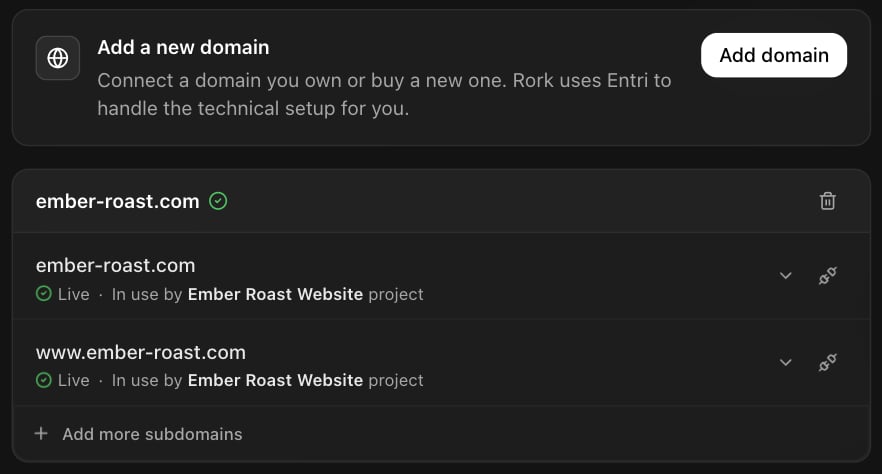
The Domains panel: Add domain on top, then each domain with its addresses and their status.
ember-roast.com and www.ember-roast.com. Each address row shows its status and, once connected, which project it serves: In use by a project, or In use by this project inside that project.
Connect a domain you own
Open Publish in the project
Press Add a custom domain
Choose Connect a domain
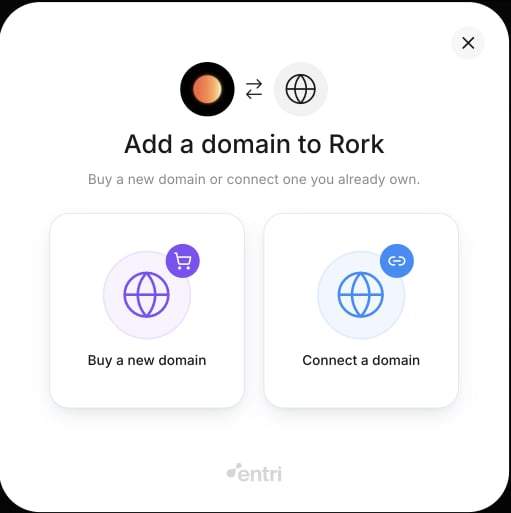
The setup window: buy a new domain, or connect a domain you already own.
Sign in to your DNS provider
www.If your provider does not support automatic setup, the window shows the exact records to add by hand. Add them at your provider. Rork picks them up on its own, and Check now on the domain checks sooner.Wait for Live
Buy a new domain
Press Add domain, then choose Buy a new domain. Search for a name and buy it in the same window.- The domain is registered with GoDaddy, in your own name. Rork is not the registrar and does not bill you for the domain.
- Right after checkout, the window can show the records to add by hand. The new domain’s DNS can take a few minutes to become available. Add the records, or wait and press Check now on the domain.
- A new domain can take a few hours to activate. When it is ready, Rork sends a Your domain is ready notice. Connect it to a project from that project’s Publish panel.
Add a subdomain
A domain starts with the root andwww. To add another address, like app.ember-roast.com:
Press Add a subdomain
Type the subdomain
app, then press Continue.Finish the setup window
app.ember-roast.com works. beta.app.ember-roast.com and wildcards like *.ember-roast.com do not.
Connect an address to a project
An address on your account serves nothing until it connects to a project. An address that is set up but not connected reads Available. Until you connect it, visitors see Rork’s “app could not be found” page.- Set up from inside the project. New addresses connect to this project on their own. There is nothing to press.
- Set up earlier, or in Settings. Open Publish → Add a custom domain in the project. On the Available row, press Connect to this project.
rork.app address in the Publish panel, each with its status. The icon on the row, Manage, opens its Setup and status. The last row now reads Add more custom domains.
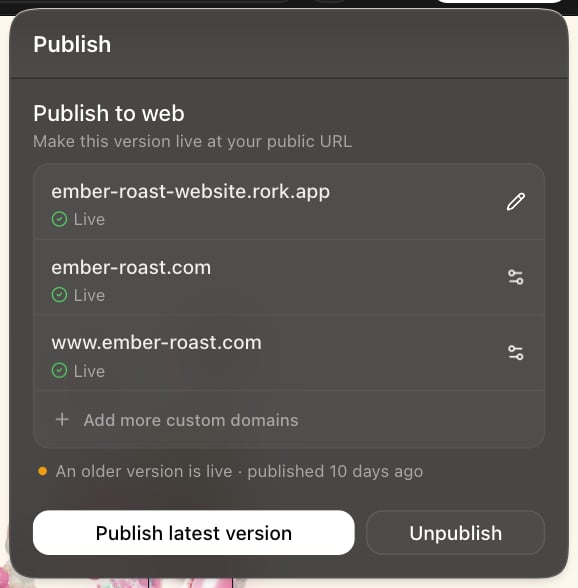
The Publish panel with two custom addresses live. This project also has a newer version waiting to go out.
Check the setup and status
Every address has a Setup and status view. In the domains list, press the chevron on the row. In the Publish panel, press Manage on the row.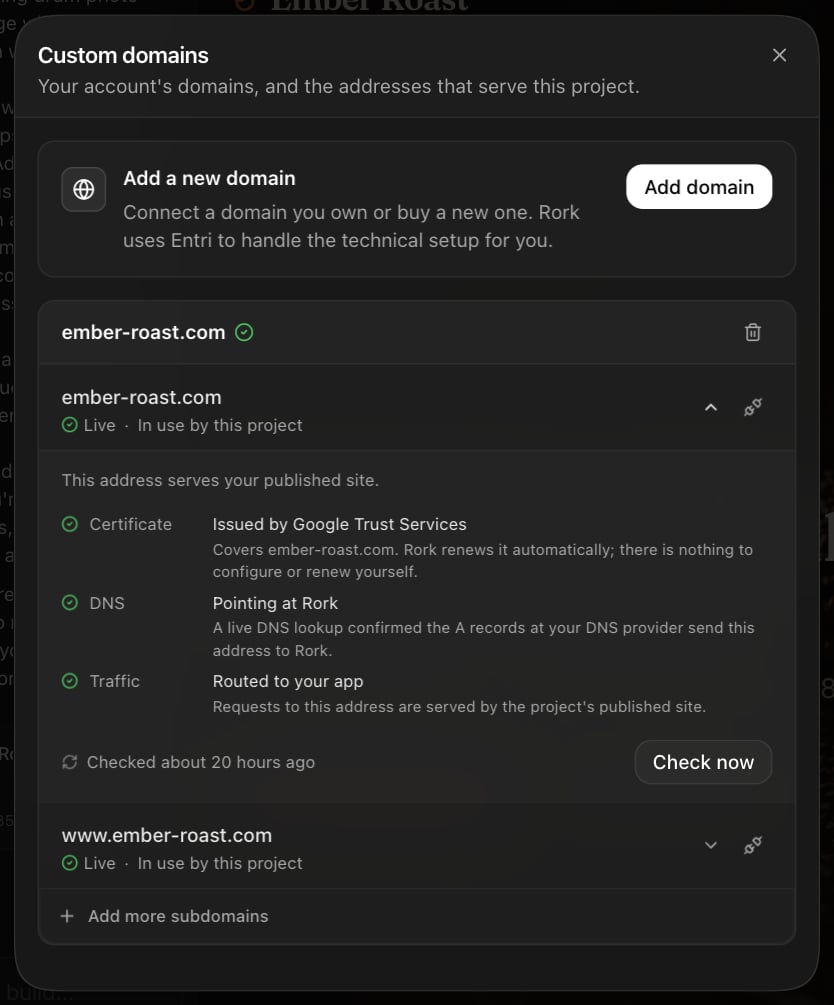
Setup and status, unfolded for one address in the Custom domains dialog.
What each status means
If the setup does not finish
The setup window can close before it is done: you close it, your provider needs manual records, or the records are still spreading. The domain then stays in the list, not verified yet, and its card says what Rork waits for. Rork keeps checking it on its own for seven days, so records you add later by hand finish without you coming back. Two buttons on the domain card speed this up:- Check now checks the records right away.
- Finish setup opens the setup window again to write the records.
HTTPS
Rork issues an HTTPS certificate for every connected address, and renews it, at no extra cost. You never upload, buy, or renew a certificate. A certificate from your registrar or your old host is not used. The setup records are enough for the certificate, so there is usually nothing to add. Three cases need a change at your DNS provider. Setup and status says which one applies.Fix a DNS conflict
The address shows DNS conflict when other records send it to a second service. This usually comes from a parked page, domain forwarding, or a website builder at the registrar. It is common on GoDaddy.- Keep the records shown in Setup and status.
- Delete the other A and AAAA records for the address, or turn off the parking, forwarding, or website builder.
- Press Check now.
www, the view can show one CNAME record to set instead. Do not delete MX (mail) or TXT records. They are not part of the problem.
Allow the certificate authorities in CAA
A CAA record limits which companies can issue certificates for your domain. If it blocks issuance, the Certificate line reads Blocked by the domain’s CAA policy. Allow all three of these in the domain’s CAA records, then check again:- Google Trust Services:
pki.goog - Let’s Encrypt:
letsencrypt.org - SSL.com:
ssl.com
Add a validation record
In rare cases the certificate needs its own validation record. Setup and status shows the exact record to copy.If your DNS is at Cloudflare
Keep the records the setup wrote as DNS only (the grey cloud). If you turn on the proxy (the orange cloud) after the address is live, the site still works. The row then reads Live via proxy, and Rork can only check that visitors reach the site, not the records. Set the record back to DNS only for full monitoring. Do not put another CDN in front of the address.Notifications
Rork tells the domain owner when something changes. The notices appear in the notification center. Collaborators do not get them.Unpublish, disconnect, or remove
- Unpublish the project. Its addresses read Site offline. The connection is kept, and the addresses come back the next time you publish.
- Disconnect an address. It stops serving the project right away. It stays reserved for your account, ready to connect again.
- Remove an address. Disconnect it first. Removing discards its HTTPS certificate, and the address is no longer reserved for your account.
- Remove a domain. Press the bin on the domain’s card. If its addresses still serve projects, the confirm lists them, each with its own Disconnect button. Remove domain unlocks once every one is disconnected. Nothing is disconnected for you.
_rork values left at your provider do no harm, and you can delete them or leave them.
What custom domains cannot do
- Only the root domain and one level of subdomain. No wildcards, and no deeper subdomains like
beta.app.ember-roast.com. - One address serves one project.
- No other CDN in front of the address.
- IP addresses and domains Rork itself runs, like
rork.app, cannot be added. - A domain verified by another Rork account cannot be added until support moves it.
- Rork does not restore DNS records that change at your provider. It tells you, and you add them back.
FAQ
Does my rork.app address keep working?
Does my rork.app address keep working?
rork.app address stays live next to it.What does a custom domain cost?
What does a custom domain cost?
Can two projects use the same address?
Can two projects use the same address?
app.ember-roast.com, for the second project.Will the setup touch my email records?
Will the setup touch my email records?
The address shows Propagating for a long time. Is something wrong?
The address shows Propagating for a long time. Is something wrong?
I published a new version. Do I have to reconnect the domain?
I published a new version. Do I have to reconnect the domain?