> ## Documentation Index
> Fetch the complete documentation index at: https://docs.rork.com/llms.txt
> Use this file to discover all available pages before exploring further.
# API keys and environment variables
> Store API keys in your Rork project instead of pasting them into code. This page explains the Secrets editor, which variables reach the phone, and how to keep a private key private.
export const CtaBanner = () =>
Build your app with Rork today.
Ship iOS, Android, and web apps by chatting with AI.
;
Most useful apps need a key: a weather API, an email sender, a payment provider, a model provider. Those keys belong in your project's **Secrets**, not in your code and not in a chat message.
## Where secrets live
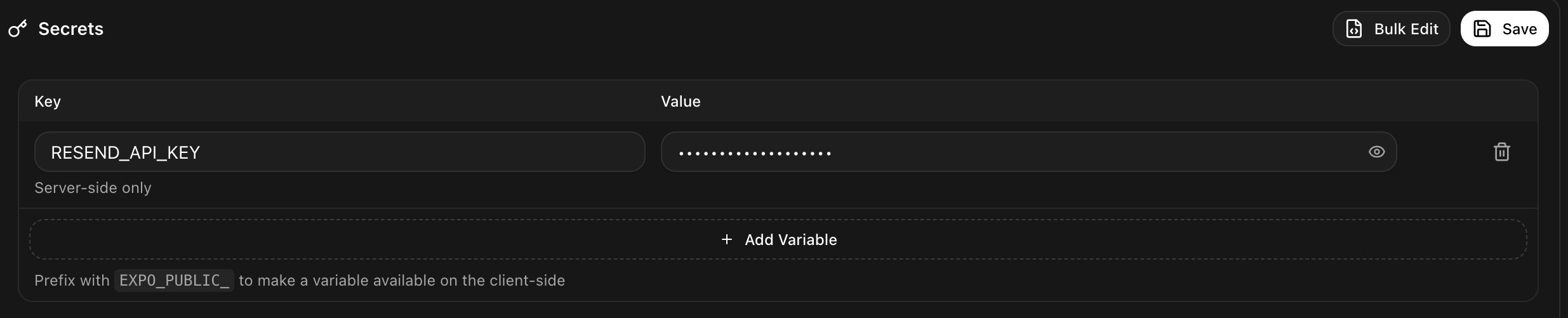
Open **More → Secrets** in a project.
A new row appears with a **Key** and a **Value**.
`RESEND_API_KEY`, `STRIPE_SECRET_KEY`, `OPENWEATHER_API_KEY`. Use the exact name the provider's documentation uses.
Rork hides it straight away. The eye button reveals it when you need to check it.
Rork stores the variable and rebuilds the parts of your app that need it.
Adding several at once is faster with **Bulk Edit**. Paste one variable per line as `KEY=value`.
## How far a variable travels
The label under each key is the important part of this page. It tells you who can read that value.
| Label | Where the value goes |
| --------------------------- | ---------------------------------------------------------- |
| **Server-side only** | Stays on the server. Your users can never read it |
| **Available at build time** | Baked into the app when it is built |
| **Available to all users** | Shipped inside the app, readable by anyone who installs it |
The rule that decides this is the name. A variable whose name starts with `EXPO_PUBLIC_` is sent to the app itself, and everything else stays server-side. The editor repeats the rule at the bottom: "Prefix with `EXPO_PUBLIC_` to make a variable available on the client-side".
Never give a secret key an `EXPO_PUBLIC_` name, and never paste one into your app's code. Anything shipped inside an app can be extracted from it, which means a leaked key on your account, used by strangers, billed to you. A private key belongs in a **Server-side only** variable, used by a server function.
Two examples make the split clear:
* `EXPO_PUBLIC_SUPABASE_URL` is fine as a public value. It is an address, and it is protected by database rules.
* `STRIPE_SECRET_KEY` must be **Server-side only**. It can move money.
If your feature needs a private key, ask Rork for a server function and it will build one:
```
Send the confirmation email from a server function so the Resend key stays private
```
Some rows are marked **Managed by Rork** or **Managed by the Supabase integration**. Rork writes and rotates those itself, so leave them alone.
## When Rork asks you for a key
You usually do not open the Secrets editor at all. When a build needs a key, Rork stops and asks in chat, with one field per key and a short description of what each one is for. Paste the values and press **Save & Continue**, and the build carries on where it stopped.
When Rork already knows the values, for example after an integration, the card asks you to confirm instead: **Yes, set them**.
## Who can see your keys
| Role | Secrets |
| ------ | --------------------------- |
| Owner | Can read and edit |
| Editor | Can read and edit |
| Viewer | Sees the panel, cannot edit |
So an editor on your project can read your keys. Invite editors accordingly. See [Share a project and work together](/collaborate/share-a-project).
A cloned project carries your variables over, except the keys Rork manages itself, which it mints fresh for the copy.
## Rotate a key you leaked
If a key ends up somewhere public, changing it in Rork is not enough. Do it in this order:
Delete or rotate it in the provider's own dashboard. That is what actually stops the key from working.
Copy the new value.
Same key name, new value, then **Save**.
If it was in your code, ask Rork to remove it and to read the value from the variable instead.
## FAQ
Prefer the Secrets editor, or the card Rork shows when it needs a key. Both keep the value out of the conversation.
No. They live with the project, not in your code, so they are not committed. Set them again in any environment you run the code yourself. See [How to sync your project with GitHub](/tutorials/how-to-connect-github).
Per project. A project with an iPhone app and a web app shares one set of variables.
Reload the preview first. If it is a native app, the value is baked in at build time, so it needs a new build. If the name is missing the `EXPO_PUBLIC_` prefix, the app cannot read it by design, and the call belongs on the server.
Not necessarily. Rork Cloud gives your app models without your own provider keys. See [What is Rork Cloud](/backend/rork-cloud).
Connecting Supabase sets them for you and marks them as managed. See [How to add a Supabase backend to Rork](/backend/supabase).
## Next steps
Use a third party API with your new key.
A backend inside Rork, with server-side keys handled for you.
Who can read your secrets, and who cannot.
Set up in-app purchases with RevenueCat.