> ## Documentation Index
> Fetch the complete documentation index at: https://docs.rork.com/llms.txt
> Use this file to discover all available pages before exploring further.

# Read the code and read the logs

> Every Rork project is a real codebase you can open, read, and on a paid plan edit by hand. The Logs panel underneath shows what your app printed while it ran.

export const CtaBanner = () => <div style={{
  display: "flex",
  alignItems: "center",
  justifyContent: "space-between",
  gap: "24px",
  flexWrap: "wrap",
  margin: "40px 0 8px",
  padding: "22px 28px",
  borderRadius: "16px",
  background: "linear-gradient(135deg,rgba(249,115,22,0.10),rgba(255,255,255,0.03),rgba(249,115,22,0.06))",
  border: "1px solid rgba(255,255,255,0.08)"
}}>
    <div>
      <div style={{
  fontSize: "19px",
  fontWeight: 700,
  color: "#fff",
  letterSpacing: "-0.3px",
  lineHeight: 1.3
}}>
        Build your app with Rork today.
      </div>
      <div style={{
  fontSize: "14px",
  color: "rgba(255,255,255,0.6)",
  marginTop: "4px",
  lineHeight: 1.5
}}>
        Ship iOS, Android, and web apps by chatting with AI.
      </div>
    </div>
    <a href="https://rork.com?utm_source=docs&amp;utm_medium=referral&amp;utm_campaign=docs-cta&amp;utm_content=cta-banner" onClick={tagCtaLink} style={{
  flexShrink: 0,
  display: "inline-block",
  padding: "10px 24px",
  background: "linear-gradient(135deg,#fff,#f0f0f0)",
  color: "#000",
  fontSize: "14px",
  fontWeight: 600,
  borderRadius: "100px",
  textDecoration: "none",
  whiteSpace: "nowrap"
}}>
      Try Rork for Free
    </a>
  </div>;

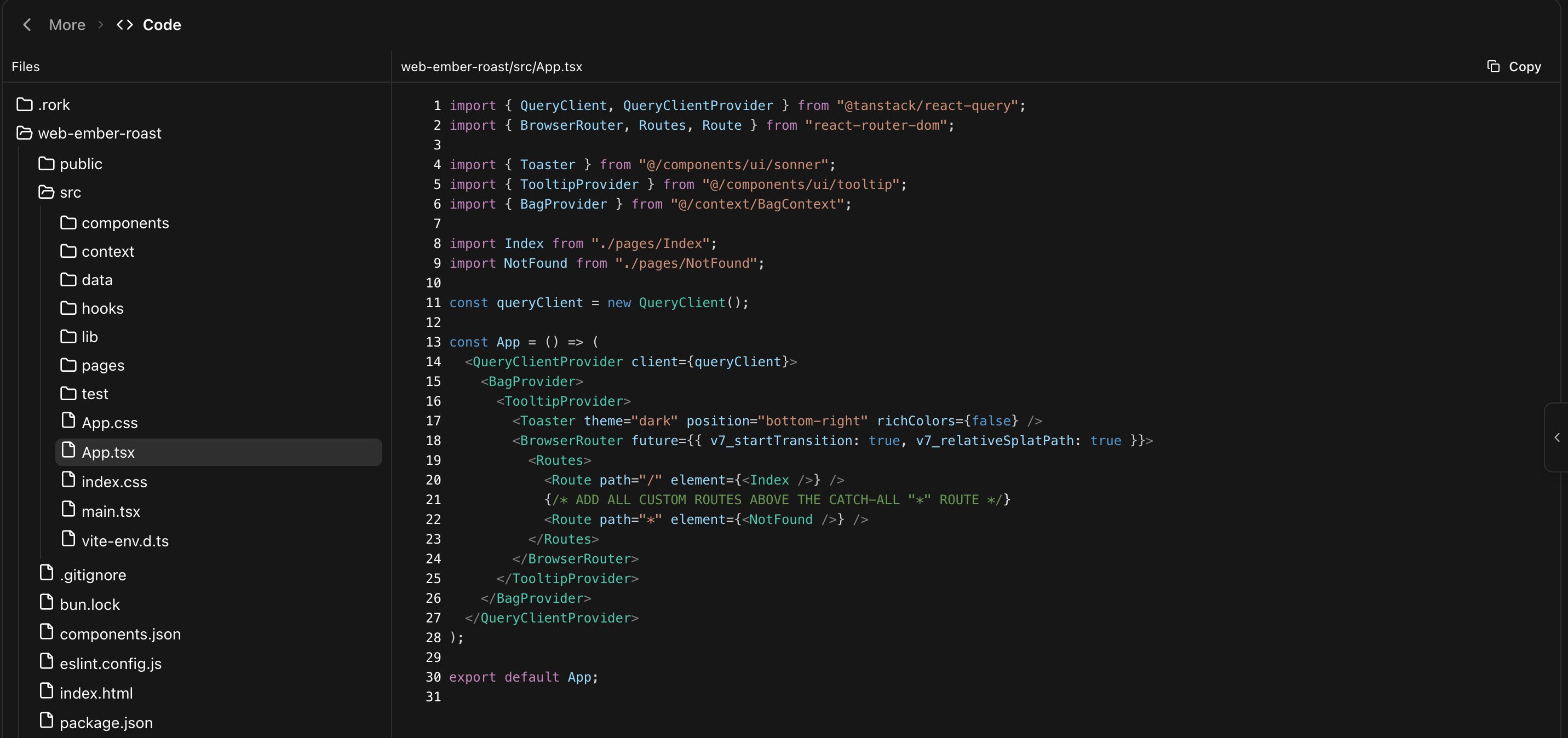
Rork is not a black box. Open **More → Code** and you get the actual project: a file tree, the source of every file, and a panel of runtime logs underneath.

<Frame caption="The Code section: the file tree on the left, the file on the right, and Copy in the corner.">
  <img src="https://mintcdn.com/rork/wazWVatNruwoHCrq/images/code/code-editor.png?fit=max&auto=format&n=wazWVatNruwoHCrq&q=85&s=6736e22eceffaac6a7aab859c88d4b1d" alt="The Rork code editor showing a web project file tree and the contents of src/App.tsx with syntax highlighting" width="2863" height="1348" data-path="images/code/code-editor.png" />
</Frame>

You do not have to read code to use Rork. But four moments make it worth opening:

1. A bug where you want to see what the agent actually wrote.
2. A value you want to check, like a price or a piece of copy.
3. Handing the project to a developer, so you know what they will get.
4. Curiosity, which is how most people end up learning this.

## Read the tree

The tree shows one folder per app in the project, so a project with an iPhone app and a web app has two. Inside is an ordinary codebase: `src/`, `components/`, `pages/`, `package.json`, and the config files a developer expects.

One folder is hidden on purpose. Rork keeps its own bookkeeping in `.rork/`, and the tree leaves it out, except for `.rork/DESIGN.md`, the design decisions from [Design mode](/features/agent-modes).

**Copy** in the top corner copies the whole open file, which is the fastest way to paste something into another tool.

## Edit by hand

<Note>
  Editing code needs a paid plan. On the free plan the editor shows a banner: "Read-only. Upgrade to a paid plan to edit code." You can still read every file.
</Note>

On a paid plan the editor is writable. Change a line and the header gains **Unsaved Changes**, with **Save** and **Reset All**. `Cmd + S` on a Mac or `Ctrl + S` on Windows saves too.

Two rules to know:

* You cannot save while the agent is working. The header says **Project updating...** until the turn finishes.
* Rork sees your edit. The next message works from the saved file, not from what it wrote earlier.

<Warning>
  Hand edits are the one part of Rork with no undo of their own. **Reset All** throws away unsaved changes, and after **Save** your edit is part of the project. Ask the agent for the change instead when you can, because then it lands as a version you can revert. See [Undo a change and go back a version](/features/undo-and-history).
</Warning>

For anything bigger than a one-line fix, ask in chat rather than typing:

```
In src/pages/Index.tsx the free delivery threshold is $30. Change it to $45 everywhere it appears.
```

The agent finds every place, not just the one you spotted.

## Read the logs

The panel at the bottom of the Code section is titled **Logs**, with a count. It shows what your app printed while it ran in the preview, in real time, tagged by level: `[log]`, `[info]`, `[warn]`, `[error]`, `[debug]`.

Scroll up for older lines, and the panel loads them as you go. The chevron on the right collapses it when you want the whole window for code.

Logs are the fastest way out of a bug the agent cannot see. When something misbehaves without an error dialog, ask for logs first:

```
Log the data coming back from the API call so we can see why the list is empty
```

Then reproduce the problem, read the panel, and paste the interesting line into chat.

<Tip>
  If the preview throws a visible error you do not need any of this. Press **Fix with Rork** on the error itself. See [Undo a change and go back a version](/features/undo-and-history#fix-an-error-instead-of-undoing).
</Tip>

## Take the code with you

The code in this tab is yours. Connect GitHub and you get it as a normal repository, with one commit per agent turn, which you can clone, run locally, and open in Xcode or Android Studio.

See [How to sync your project with GitHub](/tutorials/how-to-connect-github) and [How to test & publish your Rork app via Xcode](/how-to-set-up-xcode/how-to-set-up-xcoe).

## FAQ

<AccordionGroup>
  <Accordion title="Can I edit code on the free plan?">
    No. Reading is free, editing needs a paid plan. See [Plans & Subscriptions](/introduction/subscriptions).
  </Accordion>

  <Accordion title="Will the agent overwrite my hand edits?">
    Not silently. It reads the saved file before it changes anything. Conflicts come from editing the same lines while a turn is running, which is why saving is blocked during a turn.
  </Accordion>

  <Accordion title="Where is the .rork folder?">
    Hidden from the tree, because it is Rork's own bookkeeping. `.rork/DESIGN.md` stays visible.
  </Accordion>

  <Accordion title="Is there a search across files?">
    Not in this tab. Ask the agent instead: "which file sets the free delivery threshold?".
  </Accordion>

  <Accordion title="The Logs panel is empty.">
    It says "No logs yet. Logs from your app will appear here." Interact with the preview, and anything your app prints will arrive.
  </Accordion>

  <Accordion title="Can I run the project on my own machine?">
    Yes. Export to GitHub, then run it like any Vite, Swift, or Kotlin project.
  </Accordion>
</AccordionGroup>

## Next steps

<CardGroup cols={2}>
  <Card icon="github" href="/tutorials/how-to-connect-github" title="Sync with GitHub">
    Get the code into your own repository.
  </Card>

  <Card icon="rotate-left" href="/features/undo-and-history" title="Undo and history">
    Review the diff of any change the agent made.
  </Card>

  <Card icon="triangle-alert" href="/introduction/introduction/agent-loops" title="Get out of an error loop">
    Use logs to break a cycle of failed fixes.
  </Card>

  <Card icon="key" href="/features/secrets" title="Keys and secrets">
    Why keys do not belong in the code you just opened.
  </Card>
</CardGroup>

<CtaBanner />
