> ## Documentation Index
> Fetch the complete documentation index at: https://docs.rork.com/llms.txt
> Use this file to discover all available pages before exploring further.
> Write and edit pages for the Rork documentation site (docs.rork.com, Mintlify). Covers page structure, voice, verified-facts rule, the screenshot capture workflow with the Cursor browser, docs.json navigation, UTM tagging, and the checks to run before a PR. Use when adding or editing any .mdx page in the rork-docs repo, capturing product screenshots for docs, or updating docs.json.
# SKILL
# Rork docs
The repo is a Mintlify site. Every page is an `.mdx` file at the repo root or in a topic folder. Navigation lives in `docs.json`. A page is invisible until it is listed there.
## Non-negotiable rules
1. **Every fact comes from the product, not from memory.** The product code is at `/Users/dora/Documents/GitHub/rorkai`. Grep it for the exact UI copy, then quote that copy in the page. If a claim cannot be verified, ask the user instead of writing it.
2. **UI copy is quoted exactly and set in bold.** `**Build AAB for Play**`, not "the build button". Labels usually live in the component or in its `aria-label`.
3. **No em dashes.** Use a comma, a colon, or a second sentence.
4. **One term for one thing.** "Android app", not "Kotlin project" in the next paragraph.
5. **Screenshots come from the real product UI, in English.** Never a mockup, never a Russian UI, never a personal name or avatar.
## Page anatomy
Copy the shape of `web/rork-web.mdx`, the newest full guide.
```mdx theme={null}
---
title: "Rork Web: build and publish a web app"
sidebarTitle: "Web apps"
description: "One or two sentences. Says what the page is for, and names the product terms a reader would search for."
keywords: ["ai website builder", "publish web app", "rork web"]
---
import { CtaBanner } from '/snippets/cta-banner.mdx';
Opening paragraph: what this is, in plain words, with the platform and the
framework named. No heading above it.
## Task heading, in the imperative
Short paragraph, then the UI.
 ## FAQ
Answer in two or three sentences, with a link to the page that goes deeper.
## Next steps
One line about why to go there.
```
* `sidebarTitle` only when the `title` is too long for the sidebar.
* `` closes every page. It is the last line.
* Order of sections: what it is, how to start, how to work in it, how to publish, what it cannot do, FAQ, next steps.
* Components in use: ``, ``/``, ``, ``, ``, ``, ``/``, ``/``, plain markdown tables.
* A prompt the reader should send to the agent goes in a bare code fence:
```
Add a web version of this app
```
* A table is the right shape for "control, what it does" and for platform comparisons. Keep cells to one short line.
* Videos: ``.
## Voice
Second person, present tense, active voice. Short sentences. Say what the reader does and what the product does back.
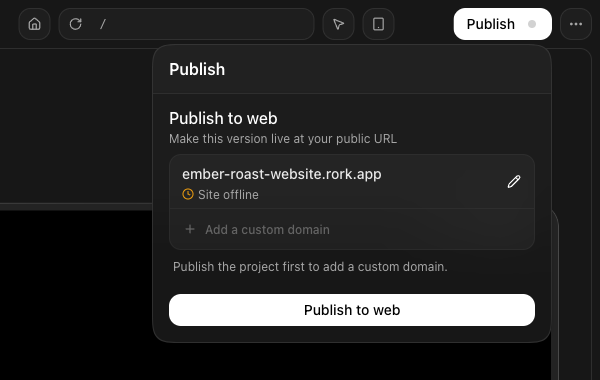
* Good: "Open **Publish**, then press **Publish to web**. Rork builds the app and hosts it at your own address on `rork.app`."
* Bad: "The application can then be deployed by the user, at which point hosting is provisioned automatically."
Facts stay exact and whole: file paths, prices, plan names, version numbers, dates. Write `$20/mo` and `submitting-to-play-store/creating-the-aab-file` in full.
State limits plainly in a "What X cannot do" list. Readers trust the page more, and support gets fewer tickets.
## Links
* Internal links are absolute paths without the extension: `/import/convert-between-platforms`.
* Every **outbound** link to a Rork property carries UTM tags:
`?utm_source=docs&utm_medium=referral&utm_campaign=docs-cta&utm_content=`
* Each platform or feature page links to its landing page on rork.com (`/web`, `/android`, `/max`, `/cloud`, `/app-store-reviewer`). The user asks for this every time, so do it in the first draft.
## Screenshots
Shots come from the signed-in product in the Cursor browser (`cursor-ide-browser`).
1. `browser_tabs` with action `list`. If another tab runs a local dev server on `localhost:3000`, leave it alone: another session may own it. Navigate a **separate** tab to `https://rork.com/` and `browser_lock` that one.
2. Drive the page:
* `browser_cdp` with `Runtime.evaluate` for cheap reads, and for typing into the prompt box:
`document.querySelector('.ProseMirror').focus(); document.execCommand('insertText', false, '...')`
* Radix menus and buttons need **real** input: `browser_mouse_click_xy` or `browser_click`. A JS `.click()` does not open them.
* `browser_mouse_click_xy` takes coordinates in **screenshot space** and needs a fresh `browser_take_screenshot` immediately before the call. Screenshot space is the 1024px-wide image; page CSS pixels are about 1.575x that.
* A menu that just opened often needs one more `browser_take_screenshot` before it shows up in the frame.
* `browser_click` and `browser_mouse_click_xy` return a full page snapshot, which is expensive. Prefer CDP reads for checking state.
3. `browser_take_screenshot` writes the full retina PNG (about 3226x1814) to `/var/folders/.../T/cursor/screenshots/page-.png`. The inline preview is downscaled; always work from the saved file.
4. Copy the keepers into `.capture/raw/` with meaningful names, then crop tight to the UI being described. Pillow is available:
```python theme={null}
from PIL import Image
im = Image.open("raw/publish.png") # 2x pixels, so multiply CSS coords by 2
im.crop((x0, y0, x1, y1)).save("../images/android/publish-panel.png")
```
5. Blur anything personal: the account avatar, real names, other people's project names. `im.crop(box).filter(ImageFilter.GaussianBlur(18))` pasted back over the box.
6. Save to `images//.png`. Use `.jpg` for wide editor shots to keep the file small. `.capture/` is scratch and stays out of the commit.
## Navigation
Add the page to `docs.json` under `navigation.pages`, in the group that matches the reader's journey: Getting started, Choosing a platform, Import your project, Build, Backend, Test on your device, Publishing, Monetization, Marketing, Billing, Frequently Asked Questions. Platform pages belong to **Choosing a platform**. Path is the file path without `.mdx`.
If a page moves or is renamed, add a `redirects` entry with `source` and `destination`.
## Before the PR
```bash theme={null}
cd /Users/dora/Documents/GitHub/rork-docs
rg -n "—" .mdx || echo "no em dash, ok"
python3 -c "import json;json.load(open('docs.json'));print('docs.json valid')"
rg -o 'src="/images/[^"]+"' .mdx | sed 's|src="/||;s|"||' | while read f; do [ -f "$f" ] && echo "ok $f" || echo "MISSING $f"; done
rg -o '\]\(/[a-z0-9/-]+\)' .mdx | tr -d '](' | while read p; do ls ".${p}.mdx" >/dev/null 2>&1 || echo "check $p"; done
```
Then branch, commit, open the PR, and merge to `main` when the user says "пуш на прод". Commit subject style, from the log: `docs(play-store): split Android testing and Play upload by project type`.
## Facts about the product that pages get wrong
Verify these in the code before repeating them, they changed recently:
* New apps are **native iPhone (Swift / SwiftUI)**, **native Android (Kotlin + Compose)**, or **web (Vite + React)**. Expo exists only for old projects, see `expo.mdx`.
* Each app in a project has **its own code**. iPhone and Android are two codebases, not one. They share the chat and the backend.
* Plans: `packages/react-shared/src/components/pricing/pricing-features/index.tsx` is the source of truth for what each plan builds.
* Publishing: iPhone goes through the in-product App Store wizard, Android produces a signed AAB for Google Play, web publishes to `.rork.app`.
## FAQ
Answer in two or three sentences, with a link to the page that goes deeper.
## Next steps
One line about why to go there.
```
* `sidebarTitle` only when the `title` is too long for the sidebar.
* `` closes every page. It is the last line.
* Order of sections: what it is, how to start, how to work in it, how to publish, what it cannot do, FAQ, next steps.
* Components in use: ``, ``/``, ``, ``, ``, ``, ``/``, ``/``, plain markdown tables.
* A prompt the reader should send to the agent goes in a bare code fence:
```
Add a web version of this app
```
* A table is the right shape for "control, what it does" and for platform comparisons. Keep cells to one short line.
* Videos: ``.
## Voice
Second person, present tense, active voice. Short sentences. Say what the reader does and what the product does back.
* Good: "Open **Publish**, then press **Publish to web**. Rork builds the app and hosts it at your own address on `rork.app`."
* Bad: "The application can then be deployed by the user, at which point hosting is provisioned automatically."
Facts stay exact and whole: file paths, prices, plan names, version numbers, dates. Write `$20/mo` and `submitting-to-play-store/creating-the-aab-file` in full.
State limits plainly in a "What X cannot do" list. Readers trust the page more, and support gets fewer tickets.
## Links
* Internal links are absolute paths without the extension: `/import/convert-between-platforms`.
* Every **outbound** link to a Rork property carries UTM tags:
`?utm_source=docs&utm_medium=referral&utm_campaign=docs-cta&utm_content=`
* Each platform or feature page links to its landing page on rork.com (`/web`, `/android`, `/max`, `/cloud`, `/app-store-reviewer`). The user asks for this every time, so do it in the first draft.
## Screenshots
Shots come from the signed-in product in the Cursor browser (`cursor-ide-browser`).
1. `browser_tabs` with action `list`. If another tab runs a local dev server on `localhost:3000`, leave it alone: another session may own it. Navigate a **separate** tab to `https://rork.com/` and `browser_lock` that one.
2. Drive the page:
* `browser_cdp` with `Runtime.evaluate` for cheap reads, and for typing into the prompt box:
`document.querySelector('.ProseMirror').focus(); document.execCommand('insertText', false, '...')`
* Radix menus and buttons need **real** input: `browser_mouse_click_xy` or `browser_click`. A JS `.click()` does not open them.
* `browser_mouse_click_xy` takes coordinates in **screenshot space** and needs a fresh `browser_take_screenshot` immediately before the call. Screenshot space is the 1024px-wide image; page CSS pixels are about 1.575x that.
* A menu that just opened often needs one more `browser_take_screenshot` before it shows up in the frame.
* `browser_click` and `browser_mouse_click_xy` return a full page snapshot, which is expensive. Prefer CDP reads for checking state.
3. `browser_take_screenshot` writes the full retina PNG (about 3226x1814) to `/var/folders/.../T/cursor/screenshots/page-.png`. The inline preview is downscaled; always work from the saved file.
4. Copy the keepers into `.capture/raw/` with meaningful names, then crop tight to the UI being described. Pillow is available:
```python theme={null}
from PIL import Image
im = Image.open("raw/publish.png") # 2x pixels, so multiply CSS coords by 2
im.crop((x0, y0, x1, y1)).save("../images/android/publish-panel.png")
```
5. Blur anything personal: the account avatar, real names, other people's project names. `im.crop(box).filter(ImageFilter.GaussianBlur(18))` pasted back over the box.
6. Save to `images//.png`. Use `.jpg` for wide editor shots to keep the file small. `.capture/` is scratch and stays out of the commit.
## Navigation
Add the page to `docs.json` under `navigation.pages`, in the group that matches the reader's journey: Getting started, Choosing a platform, Import your project, Build, Backend, Test on your device, Publishing, Monetization, Marketing, Billing, Frequently Asked Questions. Platform pages belong to **Choosing a platform**. Path is the file path without `.mdx`.
If a page moves or is renamed, add a `redirects` entry with `source` and `destination`.
## Before the PR
```bash theme={null}
cd /Users/dora/Documents/GitHub/rork-docs
rg -n "—" .mdx || echo "no em dash, ok"
python3 -c "import json;json.load(open('docs.json'));print('docs.json valid')"
rg -o 'src="/images/[^"]+"' .mdx | sed 's|src="/||;s|"||' | while read f; do [ -f "$f" ] && echo "ok $f" || echo "MISSING $f"; done
rg -o '\]\(/[a-z0-9/-]+\)' .mdx | tr -d '](' | while read p; do ls ".${p}.mdx" >/dev/null 2>&1 || echo "check $p"; done
```
Then branch, commit, open the PR, and merge to `main` when the user says "пуш на прод". Commit subject style, from the log: `docs(play-store): split Android testing and Play upload by project type`.
## Facts about the product that pages get wrong
Verify these in the code before repeating them, they changed recently:
* New apps are **native iPhone (Swift / SwiftUI)**, **native Android (Kotlin + Compose)**, or **web (Vite + React)**. Expo exists only for old projects, see `expo.mdx`.
* Each app in a project has **its own code**. iPhone and Android are two codebases, not one. They share the chat and the backend.
* Plans: `packages/react-shared/src/components/pricing/pricing-features/index.tsx` is the source of truth for what each plan builds.
* Publishing: iPhone goes through the in-product App Store wizard, Android produces a signed AAB for Google Play, web publishes to `.rork.app`.